Enterprise Compliance Guide: SOC 2 Compliant Laptop Rentals for Corporate Fleets
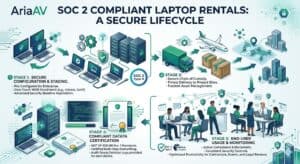
For corporate IT directors, security operations (SecOps) teams, and compliance officers, provisioning hardware for short-term projects is an absolute minefield. Whether you are bringing on 50 contract developers for a sprint, launching a temporary eDiscovery document review lab, or staging a corporate training event, every single temporary device introduces massive risk.
If a Laptop rental vendor cannot prove exactly how data is handled, your organization risks falling out of compliance with rigorous frameworks like SOC 2 Type II, HIPAA, or GDPR.
Most technology rental companies promise they “wipe the hard drives” when devices are returned. In the enterprise world, a verbal guarantee isn’t an audit trail. This guide breaks down exactly what to look for when sourcing SOC 2 compliant laptop rentals to ensure your external fleet matches your internal security posture.
1. The Risk of Unverified Short-Term Fleet Rentals
When an employee or contractor logs into corporate cloud environments, accesses source code, or handles personally identifiable information (PII) on a rented device, that machine becomes part of your compliance perimeter.
Standard commercial rental processes often suffer from three critical security gaps:
Contaminated Baselines: Devices delivered with leftover configurations or hidden malware from previous renters.
Lack of Endpoint Management: Laptops deployed “naked” without your corporate security controls, firewalls, or monitoring tools.
Opaque Data Destruction Processes: No verifiable, cryptographic proof that data was permanently erased after the project ended.
To pass your next compliance audit, your vendor’s fulfillment workflow must integrate seamlessly with your IT security guidelines.
2. Mandatory Security Protocols for Enterprise Laptop Rentals
When evaluating an enterprise technology hardware vendor, their operations must support these three operational pillars:
NIST SP 800-88 Rev. 1 Data Sanitation
Deleting files, formatting a drive, or resetting an operating system does not destroy data. A compliant rental vendor must utilize automated, multi-pass data destruction software that aligns with NIST SP 800-88 Rev. 1 (Guidelines for Media Sanitization) standards.
This process ensures that all solid-state drives (SSDs) and hard drives undergo complete physical purging or cryptographic erasure. Upon request, your vendor should issue a certified Data Erasure Log mapping the specific hardware serial number to the sanitation timestamp.
Pre-Deployment MDM Provisioning
Your internal security policies dictate that zero untrusted devices may access company servers. To maintain an unbroken chain of compliance, your rental vendor should support Mobile Device Management (MDM) imaging before the hardware ever leaves their warehouse.
Whether your enterprise relies on Microsoft Intune, Jamf, Kandji, or VMware Workspace ONE, bulk rental units can be pre-enrolled into your system. When your team boots up the machines at the deployment site, they are immediately greeted by your company’s secure login portal, complete with all corporate firewalls, VPN configurations, and endpoint protection software pre-installed.
Secure Chain of Custody & Logistics
Laptop security starts at the loading dock. True enterprise rentals should utilize localized distribution hubs to minimize third-party freight exposure. Hardware should travel in locked, tamper-evident transit cases, reducing the risk of intercept attacks or hardware-level keylogger installations during shipping.
3. Deployment Hardware Profiles
Depending on your project’s specific compliance requirements, your fleet should be configured to isolate data effectively:
| Configuration Type | Best For | Security Target |
| Pre-Imaged MDM Fleet | Contract Developers & Remote Staff | Enforces real-time corporate security policies |
| Air-Gapped Workstations | M&A Due Diligence & Clean Rooms | Disabled USB ports and zero external network access |
| Ephemeral Kiosk Mode | Corporate Training & Events | Local user data completely vanishes on every reboot |
4. Preparing for Your Next Compliance Audit
If your organization is currently undergoing an active audit, utilizing temporary hardware requires documentation. Ensure your vendor provides:
Serialized Asset Tracking: Clear tracking showing exactly which machine was deployed to which location.
Compliance Logs: Verifiable data destruction records to present directly to your auditors as proof of data boundary maintenance.
By partnering with an organization that treats logistics and staging as an extension of your own IT department, you eliminate the security liabilities usually associated with short-term event technology rental deployments.
Frequently Asked Questions
How do you guarantee data sanitation on short-term rental laptops?
Every rented laptop undergoes an automated, multi-pass data destruction protocol that meets NIST SP 800-88 Rev. 1 standards immediately upon return to our distribution hub. This process ensures all local drives are completely erased and cryptographic keys are destroyed before the hardware is re-provisioned.
Can you pre-configure rental laptops with our company’s MDM profile?
Yes. We can pre-enroll and configure bulk laptop fleets with your corporate Mobile Device Management (MDM) software, such as Jamf, Intune, or Kandji, prior to deployment. This ensures that the moment your team powers on the rental hardware, your specific security compliance controls and applications are active.
Are bulk laptop rental services suitable for companies undergoing an active SOC 2 audit?
Absolutely. We supply the necessary chain-of-custody documentation and certified data erasure logs required by compliance auditors. This provides definitive proof that temporary or contract personnel were working on hardware that strictly adhered to your organization’s internal access controls and security parameters.
